
Online MIB browser & Zabbix template generator
Load any vendor SNMP MIB, decode OIDs and snmpwalk output, and turn it into a ready-to-import Zabbix template with low-level discovery or a set of PRTG lookups, in minutes instead of hours.
Runs 100% in your browser. Your MIBs and walks are never uploaded. Access is currently invite-only during the beta.
Everything you need to monitor an SNMP device
From a raw vendor MIB file to working monitoring without writing OIDs, value maps or discovery rules by hand.
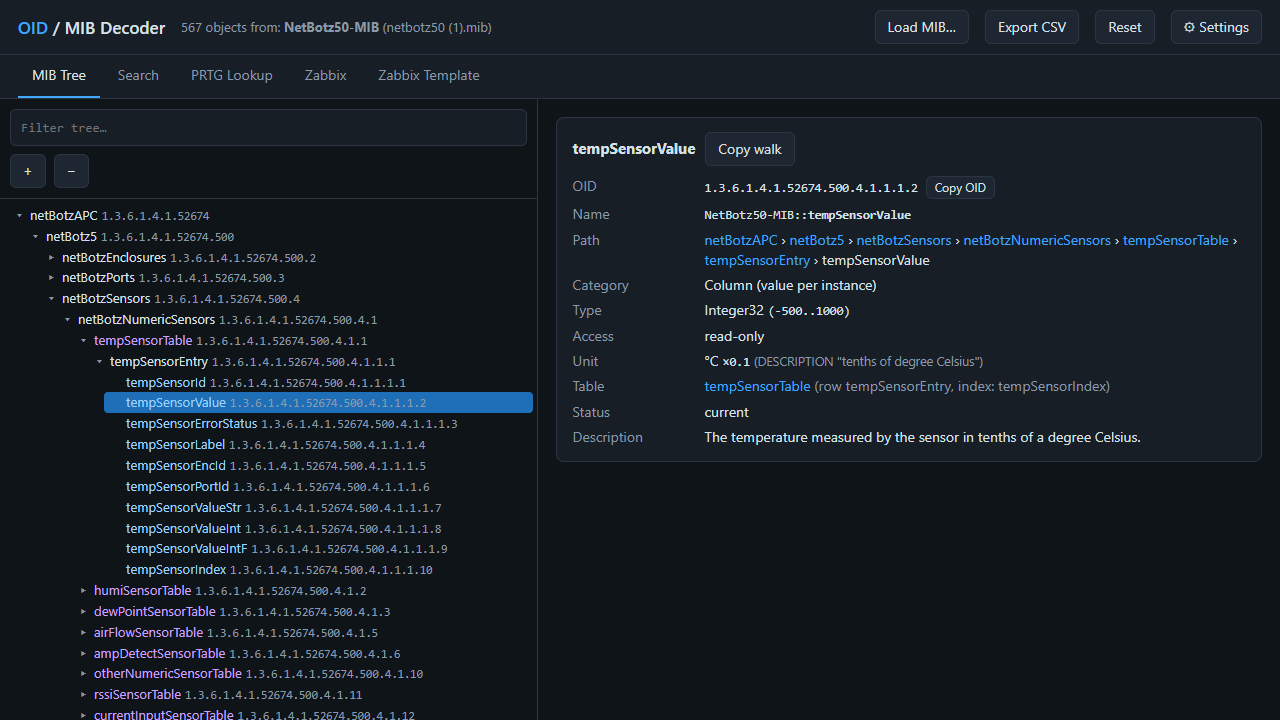
MIB browser & OID lookup
SMIv1 and SMIv2 parser with a searchable OID tree, types, enumerations, indexes, access and descriptions. Missing imported modules are detected and reported.
snmpwalk decoder
Paste numeric or symbolic snmpwalk output. Every varbind is matched to the MIB, table indexes are decoded (strings, IMPLIED, IP addresses) and unknown OIDs are explained.
Units & scaling detection
Reads UNITS clauses like "0.1 Hertz", DISPLAY-HINT "d-1" and phrases such as "tenths of degrees Celsius" and converts them to Zabbix units and multipliers.
Zabbix template export
Zabbix 6.0 to 7.4 templates in YAML, JSON or XML with LLD rules, item prototypes, value maps and threshold macros with context. One template for all identical devices.
PRTG lookup generator
Every enumerated status in the MIB becomes a PRTG .ovl value lookup with OK, Warning and Error states. Download them one by one or all at once as a ZIP.
Net-SNMP commands
Ready-to-copy snmpget, snmpwalk, snmpbulkwalk and snmptable commands for any object, for SNMP v1, v2c and v3.
How it works
Four steps from a vendor MIB to a Zabbix import file.
- Load the MIB filesDrag the vendor .mib/.txt/.my files into the page. Dependencies can be loaded in any order.
- Paste an snmpwalk (optional)The walk shows which tables and sensors the device really reports and how rows are identified.
- Pick items and trigger rulesNumeric and status objects are pre-selected. Add thresholds or use the suggested rules for error states.
- Export and importDownload the template and import it in Zabbix under Data collection › Templates › Import.
Tested with real vendor MIBs
The parser is regularly checked against the pysmi reference compiler on MIBs from UPS, PDU, environmental, storage and network vendors.
Guides
Practical walkthroughs for SNMP monitoring with Zabbix and PRTG.
How to create a Zabbix SNMP template from a MIB
LLD with walk[], item prototypes, value maps, units and trigger macros explained step by step.
Read guide →How to create PRTG lookups (.ovl) from a MIB
Turn MIB enumerations into PRTG value lookups with states, and load them on the core server.
Read guide →How to decode snmpwalk output with a MIB
OID structure, table indexes, DISPLAY-HINT, UNITS and counters: read any walk correctly.
Read guide →Frequently asked questions
Are my MIB files and SNMP walks uploaded to a server?
No. MIB Decoder parses everything locally in your browser with JavaScript. MIB files and snmpwalk output never leave your computer.
Which Zabbix versions are supported?
Templates can be exported for Zabbix 6.0, 6.4, 7.0 and 7.4 in YAML, JSON or XML. Zabbix 6.4 and newer use walk[] with SNMP walk to JSON for discovery; 6.0 uses the classic discovery[] item.
Does it support SMIv1 MIBs and TRAP-TYPE definitions?
Yes. Both SMIv1 (OBJECT-TYPE, TRAP-TYPE) and SMIv2 (MODULE-IDENTITY, NOTIFICATION-TYPE, TEXTUAL-CONVENTION) are parsed, and missing imported modules are reported.
How are units and scaling factors detected?
From the UNITS clause (for example "0.1 Hertz" or "tenth Volts"), DISPLAY-HINT "d-1" style hints, and explicit phrases in DESCRIPTION such as "in tenths of degrees Celsius". The result becomes Zabbix units plus a custom multiplier preprocessing step.
Can I use the generated template on many identical devices?
Yes. Tables are monitored with low-level discovery, so the template contains no fixed indexes; each device discovers its own sensors and indexes.